
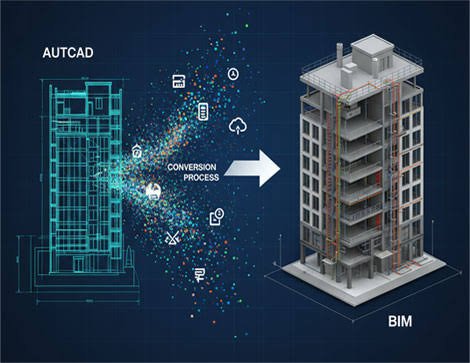
The construction industry relies on accurate drawings, coordinated building systems, and reliable project information to deliver successful projects. For decades, Computer-Aided Design (CAD) has played an essential role in architectural, structural, and engineering documentation. However, as construction projects become more complex, traditional 2D drawings alone may not provide the level of coordination and information management required by modern project teams.
This is where CAD to BIM Conversion Services become valuable.
CAD to BIM conversion transforms existing CAD drawings into structured Building Information Models (BIM), allowing architects, engineers, contractors, and developers to visualize building components in a coordinated digital environment.
Instead of working exclusively with separate 2D drawings, project teams can use BIM models to understand spatial relationships, review design information, identify potential conflicts, and support construction planning.
For commercial construction projects in the USA, professional CAD to BIM conversion can be particularly useful when contractors receive traditional design documentation but need coordinated digital models for pre-construction, MEP coordination, quantity takeoffs, or prefabrication.
In this guide, we explain what CAD to BIM conversion is, how the process works, its major benefits, common applications, and why contractors should consider professional CAD to BIM conversion services.
What Is CAD to BIM Conversion?
CAD to BIM conversion is the process of transforming existing CAD drawings into digital building information models containing structured geometric and non-geometric information.
CAD drawings typically represent building components through lines, shapes, annotations, dimensions, and other drafting elements.
BIM models, by comparison, use digital building objects that can represent actual construction components such as walls, beams, doors, pipes, ducts, and equipment.
For example, a wall shown in a CAD drawing may consist of several lines and annotations.
In a BIM model, the same wall can be represented as a building element containing information about its dimensions, position, type, and potentially its materials and other properties.
This distinction allows BIM models to support applications beyond traditional drafting, including multidisciplinary coordination, clash detection, quantity analysis, and construction planning.
However, CAD to BIM conversion is not simply an automatic file-format change. Developing a useful BIM model requires interpreting the source drawings, establishing modeling requirements, creating building elements, and validating the resulting information.
What Is the Difference Between CAD and BIM?
Although CAD and BIM are both used in construction design and documentation, they have different approaches to representing project information.
Computer-Aided Design (CAD) primarily supports drafting and geometric representation, while Building Information Modeling (BIM) provides a structured environment for representing and managing building information.
| Feature | CAD | BIM |
|---|---|---|
| Primary purpose | Drafting and geometric documentation | Building modeling and information management |
| Common representation | Lines, shapes, and drawing objects | Information-rich building components |
| Visualization | 2D and 3D capabilities | Coordinated building models |
| Building information | Often maintained through annotations and separate documentation | Can be associated with model elements |
| Coordination | Drawing comparisons and related workflows | Federated models and model-based coordination |
| Quantity takeoffs | Drawing-based measurements | Potential model-based quantity extraction |
| Clash detection | Manual or tool-assisted review | Model-based interference checking |
| Clash detection | Drawing and file revisions | Model revisions and associated documentation |
CAD remains an important tool in the construction industry. BIM does not eliminate the need for CAD drawings or traditional construction documentation.
Instead, CAD to BIM conversion helps project teams use existing design information within a model-based workflow.
Why Is CAD to BIM Conversion Important in Construction?
Many construction projects begin with architectural, structural, mechanical, electrical, and plumbing drawings prepared in CAD.
These drawings may contain detailed design information but can be challenging to coordinate across multiple disciplines.
For example, a contractor may receive separate drawings for:
- Architectural layouts
- Structural framing
- HVAC systems
- Electrical distribution
- Plumbing networks
- Fire protection systems
Each drawing set describes a different part of the building.
Without a coordinated model, understanding how these systems interact may require extensive manual review.
Professional CAD to BIM Conversion Services allow project teams to develop digital models from available drawings and evaluate building components together.
This can improve visualization, support coordination, and make certain types of project information easier to manage.
The CAD to BIM Conversion Process: Step by Step
A reliable CAD to BIM workflow involves several stages. The exact process depends on project complexity, source documentation, required model detail, and intended BIM applications.
Step 1: Reviewing Existing CAD Drawings
The process begins with reviewing the available CAD files and project documentation.
These may include:
- Architectural floor plans
- Building elevations
- Sections
- Structural drawings
- HVAC layouts
- Electrical drawings
- Plumbing drawings
- Fire protection drawings
- Equipment schedules
- Technical specifications
The BIM team evaluates drawing completeness, revisions, scales, coordinates, and other information relevant to model development.
Any missing or conflicting information should be identified before modeling proceeds.
Step 2: Defining BIM Requirements
Before creating the model, the project team establishes its intended uses and deliverables.
Important requirements may include:
- Required disciplines
- Model development expectations
- Level of Development (LOD)
- Coordinate system
- Model organization
- File formats
- Required parameters
- Coordination objectives
- Delivery schedule
These requirements help ensure that the model is developed for the project’s actual needs.
For example, a model intended for design visualization may require different information from one intended for detailed MEP coordination or fabrication planning.
Step 3: Preparing the CAD Files
CAD files are reviewed and prepared for use as modeling references.
This may involve checking:
- Drawing units
- Layer organization
- External references
- File integrity
- Drawing alignment
- Gridlines
- Levels
- Revisions
Proper preparation reduces the risk of creating models from incorrect or inconsistent information.
Step 4: Developing the BIM Model
The BIM team creates building components based on the available drawings and agreed requirements.
Depending on the discipline, this may include:
Architectural components: Walls, doors, windows, floors, ceilings, roofs, and stairs.
Structural components: Columns, beams, slabs, foundations, and framing elements.
Mechanical components: Ductwork, mechanical piping, HVAC equipment, and associated systems.
Electrical components: Conduits, cable trays, electrical equipment, lighting, and distribution systems.
Plumbing components: Piping, fixtures, valves, fittings, and equipment.
The model is developed to represent the intended design information as accurately as the source documents and modeling scope allow.
Step 5: Adding Relevant Building Information
BIM models may contain information beyond geometry.
Depending on project requirements, model elements can include:
- Component names
- Dimensions
- System classifications
- Material information
- Equipment identifiers
- Element types
- Other specified properties
The information added should correspond to the agreed BIM deliverables.
Step 6: Coordinating Discipline Models
Once the models have been developed, they may be combined into a federated environment.
This allows project teams to review relationships between architectural, structural, and MEP systems.
For example, the BIM team can examine whether ductwork routes interfere with structural beams or whether piping conflicts with electrical services.
Step 7: Quality Checking and Validation
Before delivery, the models should undergo appropriate quality checks.
These may include:
- Comparing models with source drawings
- Reviewing geometry
- Checking model alignment
- Verifying levels and grids
- Reviewing component information
- Identifying missing elements
- Checking coordination issues
- Confirming required deliverables
Quality control is essential because inaccurate source information or modeling errors can affect downstream BIM applications.
Step 8: Delivering the BIM Models
Final deliverables depend on project requirements.
They may include native BIM files, IFC models, coordinated models, exported drawings, or related documentation.
The client should confirm that the delivered information is suitable for its intended uses before relying on it for construction-related decisions.
Key Benefits of CAD to BIM Conversion Services
Converting CAD drawings into BIM models can provide several practical benefits during design and pre-construction.
1. Improved Building Visualization
One of the most significant benefits is the ability to visualize building components in a three-dimensional environment.
Instead of interpreting numerous 2D drawings, contractors can review the building geometry and relationships between systems.
This can be particularly useful for complex commercial buildings with extensive structural and MEP installations.
2. Better Multidisciplinary Coordination
Construction projects require different disciplines to work together.
Architectural, structural, mechanical, electrical, and plumbing designs must ultimately fit within the same physical building.
CAD to BIM conversion can provide models that support multidisciplinary coordination and allow project teams to identify potential design conflicts.
3. Support for BIM Clash Detection
Clash detection is one of the most valuable applications of coordinated BIM models.
For example:
- HVAC ductwork may intersect structural framing
- Plumbing pipes may conflict with electrical conduits
- Cable trays may interfere with mechanical equipment
- Fire protection piping may overlap with other services
Professional BIM coordination can help teams identify these issues before installation.
However, clash detection results depend on model completeness, geometry, and appropriate testing rules.
4. Improved Project Communication
Three-dimensional models can help project stakeholders understand design intent more clearly.
Architects, engineers, contractors, subcontractors, and clients can use model views to discuss complex building areas and proposed design changes.
This may reduce misunderstandings during coordination meetings.
5. Support for Quantity Takeoffs
Properly developed BIM models can contain geometric and component information useful for quantity analysis.
Depending on model content, estimators may review quantities associated with:
- Walls
- Floors
- Concrete elements
- Doors and windows
- Ductwork
- Piping
- Equipment
Model-based quantities must still be verified against project drawings, specifications, and scope requirements.
6. Better Change Management
Construction designs frequently change during development.
BIM models can help teams visualize revised building components and understand their relationships with other systems.
However, models must be updated when approved changes occur, and project teams need appropriate revision-control procedures.
7. Support for Prefabrication
Detailed BIM models can help teams prepare coordinated information for certain prefabricated construction components.
This is especially relevant for mechanical and electrical assemblies, modular plantrooms, service corridors, and prefabricated MEP systems.
CAD to BIM Conversion for Different Construction Disciplines
CAD to BIM conversion can be applied across several disciplines.
Architectural CAD to BIM Conversion
Architectural conversion involves developing building models from architectural drawings.
The resulting models may represent walls, floors, roofs, doors, windows, and other architectural components.
These models can support visualization, coordination, and documentation.
Structural CAD to BIM Conversion
Structural conversion involves modeling structural elements from existing drawings.
These may include beams, columns, foundations, slabs, and framing systems.
Structural BIM models can support coordination with architectural and MEP components.
MEP CAD to BIM Conversion
MEP conversion focuses on mechanical, electrical, plumbing, and related building systems.
It may include modeling:
- HVAC ductwork
- Mechanical equipment
- Mechanical piping
- Electrical conduits
- Cable trays
- Electrical panels
- Plumbing piping
- Plumbing fixtures
- Fire protection systems
MEP models are particularly useful for identifying conflicts in congested installation areas.
How CAD to BIM Conversion Supports MEP Coordination
MEP systems often require detailed coordination because they share limited space within a building.
Mechanical rooms, ceiling voids, vertical shafts, and service corridors may contain multiple systems installed close to one another.
When MEP drawings are converted into coordinated BIM models, project teams can review these systems in a shared three-dimensional environment.
This can help identify potential problems involving:
- Ductwork routing
- Pipe clearances
- Electrical equipment access
- Cable tray positioning
- Fire protection coordination
- Mechanical equipment placement
Early identification of these issues may help reduce avoidable field modifications and installation interruptions.
CAD to BIM Conversion and Construction Estimating
Construction estimating depends on reliable project quantities and scope information.
CAD drawings are commonly used for quantity takeoffs, but BIM models can provide an additional source of structured geometric information.
For example, model elements may support analysis of concrete volumes, wall areas, duct lengths, or equipment quantities.
These quantities can then be reviewed and used alongside pricing information to develop cost estimates.
Combining CAD to BIM Conversion Services with Construction Estimating Services may help project teams connect design information with pre-construction cost planning.
However, BIM does not automatically generate a complete construction estimate. Experienced estimators must still account for materials, labor, equipment, installation methods, project conditions, and other cost factors.
CAD to BIM Conversion for Commercial Construction
Commercial construction projects often involve extensive building systems and multiple design disciplines.
Examples include:
- Office buildings
- Hospitals and healthcare facilities
- Hotels
- Educational institutions
- Retail developments
- Warehouses
- Industrial facilities
- Multifamily developments
- Mixed-use buildings
These projects may benefit from CAD to BIM conversion when the available documentation is primarily drawing-based but the construction team requires model-based coordination.
The value of conversion depends on the project’s complexity, available source information, and intended BIM applications.
CAD to BIM Conversion for Renovation Projects
CAD to BIM conversion can also support renovation and refurbishment projects.
Existing buildings may have historical CAD drawings or other design documentation that can be used to develop a preliminary digital model.
Such models can help project teams visualize the existing building layout and plan proposed modifications.
However, historical drawings do not necessarily represent current site conditions.
Where accurate existing-condition information is required, site surveys or laser scanning may be needed to verify the building geometry.
This distinction is important: CAD to BIM conversion uses existing documentation, while Scan to BIM typically relies on measured survey or point-cloud information.
What Is LOD in CAD to BIM Conversion?
Level of Development (LOD) describes the degree to which model elements have been developed and the reliability of their information for defined uses.
Commonly referenced levels include:
- LOD 100: Conceptual or approximate representations
- LOD 200: Generic components with approximate geometry
- LOD 300: More specifically developed components for defined uses
- LOD 350: Additional information about interfaces and connections
- LOD 400: Fabrication- and assembly-related information
- LOD 500: Field-verified existing-condition representation
These descriptions are simplified. Actual requirements depend on the applicable BIM specification and project agreements.
Higher LOD requirements generally involve additional modeling effort.
Contractors should therefore define the required level of development according to the intended purpose rather than requesting maximum detail for every component.
Common Challenges in CAD to BIM Conversion
Although CAD to BIM conversion can provide important benefits, several challenges may affect the process.
Incomplete or Outdated Drawings
Missing information and outdated revisions can make it difficult to develop reliable models.
Inconsistent Drawing Standards
CAD files from different disciplines may use different layers, units, naming conventions, or coordinates.
Missing Building Information
CAD drawings may not contain all the material properties, component classifications, or other information required for a BIM model.
Complex MEP Systems
Detailed mechanical, electrical, and plumbing models may require significant interpretation and coordination.
Unclear Modeling Requirements
Without defined deliverables and model uses, teams may develop models that are either insufficiently detailed or unnecessarily complex.
Quality-Control Requirements
Converted models must be reviewed carefully to ensure that geometry and information are consistent with the approved source documents.
These challenges highlight the importance of using experienced BIM professionals and establishing clear project requirements.
How Much Do CAD to BIM Conversion Services Cost?
The cost of CAD to BIM conversion depends on several factors.
These include:
- Project size
- Building complexity
- Number of disciplines
- Quality of existing CAD drawings
- Required Level of Development
- MEP system complexity
- Required model information
- Coordination requirements
- Project deadlines
- Final deliverables
For example, converting a small architectural drawing set into a basic BIM model generally requires a different level of effort from developing detailed architectural, structural, and MEP models for a large commercial building.
There is no universal price that applies to every project.
Contractors should request a project-specific quotation based on the available drawings, required deliverables, and intended BIM uses.
Why Contractors Need Professional CAD to BIM Conversion Services
Contractors may consider professional CAD to BIM conversion when their projects require model-based workflows but the available design documentation consists mainly of CAD drawings.
Professional support can be particularly useful when:
- The project requires multidisciplinary BIM coordination
- Architectural and structural drawings need to be modeled
- MEP systems require detailed spatial review
- Clash detection is part of the pre-construction process
- BIM-based quantity analysis is required
- The project involves prefabrication
- Existing CAD drawings must support new BIM workflows
- Internal BIM resources are limited
- The project requires coordinated digital deliverables
Outsourcing CAD to BIM conversion can provide additional modeling capacity without requiring contractors to develop every model internally.
The decision should depend on project requirements, available resources, and the expected value of the resulting BIM information.
How to Choose a CAD to BIM Conversion Services Provider
Choosing the right provider is important because the quality of the converted model affects its usefulness.
Contractors should evaluate the following factors:
- Experience with architectural, structural, and MEP modeling
- Understanding of construction drawings and specifications
- Familiarity with BIM standards and coordination workflows
- Ability to work with different CAD formats
- Experience with model development requirements
- Quality-control procedures
- Clash detection and coordination capabilities
- Communication and revision-management processes
- Required software and delivery formats
- Experience supporting construction projects in the USA
Before beginning work, contractors should clearly communicate the project scope, required model uses, development expectations, and deadlines.
How NUR Engineering Supports CAD to BIM Conversion Services
NUR Engineering provides BIM & VDC, MEP engineering, DFMA, and construction estimating services for contractors, developers, engineers, and construction professionals working on projects in the USA.
Our BIM & VDC Services include:
- CAD to BIM Conversion
- BIM Modeling
- Clash Detection & Coordination
- Value Engineering Models
- Prefabrication / Modular BIM Support
Our MEP Engineering Services include:
- HVAC System Design
- Electrical System Design
- Low Voltage & Security Systems
- Fire Protection & Fire Alarm Systems
- Plumbing & Piping Design
- Tender Services
We also provide DFMA Services, including:
- Shop Drawings
- Bills of Material
- Fabrication Design
- Plantroom, Shaft, and Corridor Modules
- Prefabricated Module Drawings
Our Estimation Services include:
- Construction Cost Estimating
- Construction Estimating
- Quantity Takeoffs
- Project Scheduling & Takeoff
- Consultancy Services
- Drafting & Additional Services
By combining these capabilities, NUR Engineering can support construction workflows involving digital modeling, multidisciplinary coordination, quantity analysis, MEP engineering, and fabrication planning.
Whether your project requires converting existing CAD drawings into BIM models or developing coordinated MEP models for pre-construction, our team can review your documentation and discuss the appropriate scope of work.
Final Thoughts
CAD to BIM conversion plays an important role in connecting traditional construction documentation with modern digital workflows.
Professional CAD to BIM Conversion Services help contractors, architects, engineers, and developers transform existing drawings into structured models that can support visualization, coordination, clash detection, quantity analysis, and construction planning.
For complex commercial construction projects, this can provide greater visibility into building systems and their spatial relationships before installation begins.
However, successful conversion depends on reliable source drawings, clearly defined BIM requirements, experienced modeling professionals, and appropriate quality-control procedures.
NUR Engineering provides CAD to BIM Conversion Services, BIM Modeling, BIM Clash Detection & Coordination, MEP engineering, construction estimating, and DFMA support for projects in the USA.
Have an upcoming construction project with CAD drawings? Contact NUR Engineering to discuss how our BIM & VDC services can support your project’s modeling and coordination requirements.
Frequently Asked Questions
What is CAD to BIM conversion?
CAD to BIM conversion is the process of transforming existing CAD drawings into structured Building Information Models. These models can contain geometric and component information that supports visualization, coordination, and other construction workflows.
What are CAD to BIM Conversion Services?
CAD to BIM Conversion Services involve developing BIM models from existing CAD drawings, according to defined project requirements. Services may include architectural, structural, and MEP modeling, model coordination, and quality checking.
What is the difference between CAD and BIM?
CAD primarily supports drafting and geometric representation, while BIM uses structured building components and associated information to support modeling, coordination, and project information management.
Can 2D CAD drawings be converted into 3D BIM models?
Yes. Existing 2D CAD drawings can be used as references to develop 3D BIM models. However, the process generally requires modeling expertise and interpretation of the available design information.
What software is used for CAD to BIM conversion?
Commonly used tools include Autodesk AutoCAD and Autodesk Revit, along with other BIM authoring and coordination platforms. The appropriate software depends on project requirements and delivery formats.
How long does CAD to BIM conversion take?
The required time depends on project size, drawing quality, complexity, number of disciplines, required model development, and deliverables. A project-specific review is necessary to establish a realistic timeline.
How much does CAD to BIM conversion cost?
Costs depend on project scope, building complexity, source drawings, required LOD, coordination requirements, and deadlines. Contractors should request a quotation based on their specific project documentation.
Can CAD to BIM conversion help with clash detection?
Yes. Converted BIM models can support clash detection when they contain sufficiently developed and coordinated building elements. The models must be suitable for the intended clash tests.
Is CAD to BIM conversion useful for MEP projects?
Yes. CAD to BIM conversion can help project teams develop coordinated models of HVAC, electrical, plumbing, and fire protection systems, particularly in congested building areas.
Can BIM models created from CAD drawings be used for estimating?
Yes. Properly developed models can support quantity analysis and construction estimating. However, model quantities should be verified against drawings, specifications, and project requirements.
What documents are needed for CAD to BIM conversion?
Typical inputs include architectural, structural, and MEP CAD drawings, elevations, sections, specifications, equipment schedules, project requirements, and current design revisions.
Why should contractors outsource CAD to BIM Conversion Services?
Contractors may outsource conversion to access specialized modeling expertise, increase project capacity, support multidisciplinary coordination, or meet BIM requirements without expanding their internal modeling teams.